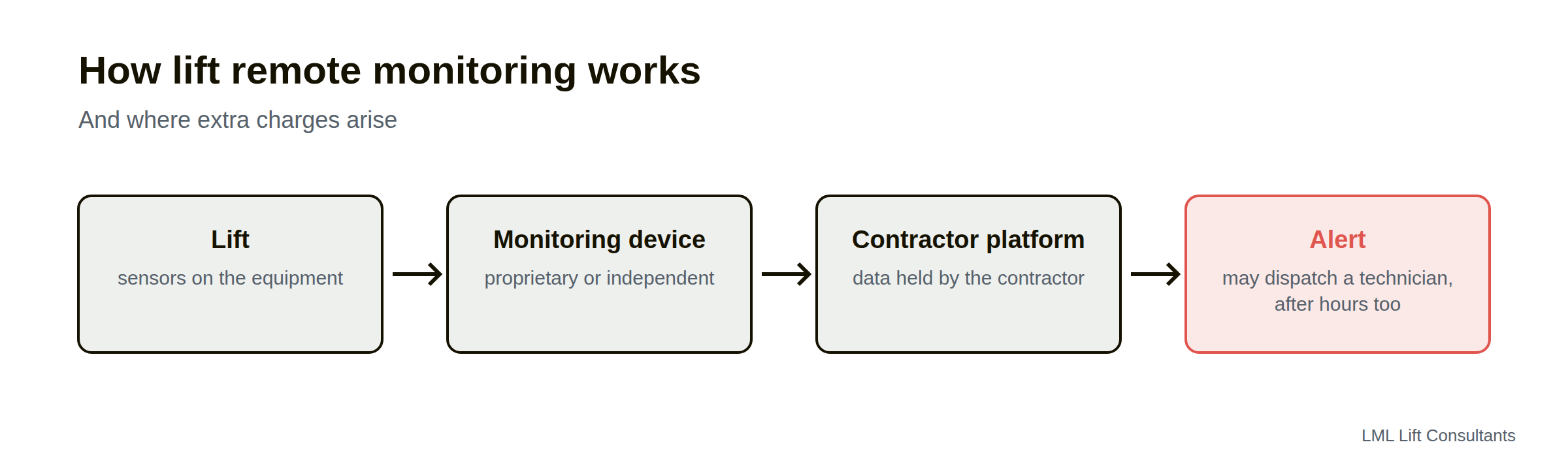
Every major Lift company now offers remote monitoring. Sensors connect your Lifts to the contractor's systems and report faults as they happen, and the companies promise to predict failures before they occur. It is often called IoT, the Internet of Things.
Monitoring can improve reliability. Set up carelessly, it also brings extra charges and a stream of data the owner never sees, so it pays to check the terms before you sign up.
What remote monitoring does
Reports faults in real time, so a technician can be sent before anyone calls
Records usage and performance data, such as trips, door cycles and faults
Can predict some failures from patterns in the data and other sensors that may detect things such as temperature, current and vibration changes amongst others
Proprietary and independent systems
Most monitoring is supplied by the maintenance contractor and connects to its own platform. Independent, non-proprietary monitors are also available. They sit alongside the Lift without connecting to its controller, and we saw a growing range of them at Interlift.
The charges to watch
After-hours callouts
An alert at 2am can trigger a technician visit billed at after-hours rates, even for a minor fault that could have waited until morning. Check what the system triggers, and who pays.
Monitoring subscription fees
Callouts triggered by alerts, especially after hours
Charges to access your own data
Who owns the data?
If the monitoring belongs to the contractor, so does the history, and it may leave with them when the contract changes. Ask for regular reports and the right to take the data with you.
What to put in your contract
What the system monitors and what it triggers
Which alerts can dispatch a technician, and when
Who pays for alert-driven callouts, in and out of hours
Access to data and reports, and data ownership at contract end
After-hours callouts are often charged at higher rates than normal-hours ones, with a minimum charge, so agree in advance which alerts can send a technician out of hours. Monitoring helps reduce breakdowns only when someone reviews the data with the contractor.
What the data can show
Monitoring data can answer questions that owners usually can't:
How often each Lift breaks down, and why
Repeat faults on the same Lift, which point to problems that keep being reset without being fixed
Door faults, the most common source of breakdowns in many buildings
Availability: the share of time each Lift was in service
Usage: trips and running hours, which help when planning modernisation
Security and privacy
A connected Lift is part of the building's network. Ask how the device connects (usually over a mobile connection rather than the building network), who can access the data, how the software is updated, and what happens to the data if the contract ends. Many of these devices connect directly to the Lift's controller, or to a cloud platform, so the concern is making sure monitoring does not unintentionally provide a pathway for remote control or cyberattack.
We would typically start by determining exactly what is connected. Ask the Lift manufacturer for:
A network architecture diagram
A description of all remote monitoring functions
Confirmation of whether the connection is monitoring only (read-only), monitoring and diagnostics, or full remote control capability
Proprietary or independent: how to choose
Each kind of monitoring suits different owners:
Contractor-supplied monitoring links directly to the contractor's systems and dispatch. It works well when the contract controls what alerts trigger and who pays.
Independent monitoring sits alongside the Lift and reports to a platform the owner chooses. It suits mixed-brand portfolios and owners who want to keep their data when they change contractor.
Questions to ask before you sign up
What does the system monitor, and what can't it see?
Which alerts send a technician, and at what times of day?
Who pays for an alert-driven callout that turns out to be minor?
What reports will we receive, and how often?
What happens to the data if we change contractor?
Using the data to manage the contractor
Monitoring data is most useful in the monthly meeting with the contractor, where you can go through breakdown trends, repeat faults and response times with the figures in front of you.
Questions people ask
Is Lift remote monitoring worth it?
Often, as long as the contract controls what the monitoring triggers and you can see the data.
Can I keep my monitoring data if I change contractor?
Only if your contract gives you that right, or if you use an independent monitor.
Does remote monitoring replace maintenance visits?
No. Remote monitoring gives you more information about the lifts, and they still need hands-on maintenance.
Talk to us about monitoring
LML Lift Consultants writes monitoring terms into maintenance agreements and advises on independent monitoring for portfolios.
{"@context":"https://schema.org","@graph":[{"@type":"Article","@id":"https://www.lmlliftconsultants.com.au/insights/lift-remote-monitoring#article","headline":"Remote monitoring on Lifts: what it tells you and what it costs","description":"What Lift remote monitoring (IoT) can and can't tell you, who owns the data it collects, and which charges to check before you sign up.","image":"https://cdn.prod.website-files.com/6a7fb1da29c27a176bd73b52/6ab1c729c285e44560268ca9_xtrNwDXr.png","datePublished":"2026-10-15T04:00:00.000Z","dateModified":"2026-10-15T04:00:00.000Z","author":{"@id":"https://www.lmlliftconsultants.com.au/#organisation"},"publisher":{"@id":"https://www.lmlliftconsultants.com.au/#organisation"},"mainEntityOfPage":{"@id":"https://www.lmlliftconsultants.com.au/insights/lift-remote-monitoring#webpage"},"inLanguage":"en-AU"},{"@type":"WebPage","@id":"https://www.lmlliftconsultants.com.au/insights/lift-remote-monitoring#webpage","url":"https://www.lmlliftconsultants.com.au/insights/lift-remote-monitoring","name":"Lift Remote Monitoring: What It Tells You and Costs","isPartOf":{"@id":"https://www.lmlliftconsultants.com.au/#website"},"breadcrumb":{"@id":"https://www.lmlliftconsultants.com.au/insights/lift-remote-monitoring#breadcrumb"},"primaryImageOfPage":"https://cdn.prod.website-files.com/6a7fb1da29c27a176bd73b52/6ab1c729c285e44560268ca9_xtrNwDXr.png","inLanguage":"en-AU"},{"@type":"BreadcrumbList","@id":"https://www.lmlliftconsultants.com.au/insights/lift-remote-monitoring#breadcrumb","itemListElement":[{"@type":"ListItem","position":1,"name":"Home","item":"https://www.lmlliftconsultants.com.au/"},{"@type":"ListItem","position":2,"name":"Insights","item":"https://www.lmlliftconsultants.com.au/insights"},{"@type":"ListItem","position":3,"name":"Remote monitoring on Lifts: what it tells you and what it costs","item":"https://www.lmlliftconsultants.com.au/insights/lift-remote-monitoring"}]}]}
Get an independent view before you decide
We sell no equipment and take no commissions. Tell us about your building and a consultant will come back to you.